The last two modules of Introduction to Parallel Programming with CUDA go over the other major types of memory and how to interact with them. I’m also going to add a bit of my own commentary and things that weren’t fully explored in the course.
Memory Overview
Let’s look at a bird’s eye view of the GPU memory, using the visual that was in the course. I attempted to find the original (less blurry) version but haven’t found it yet.
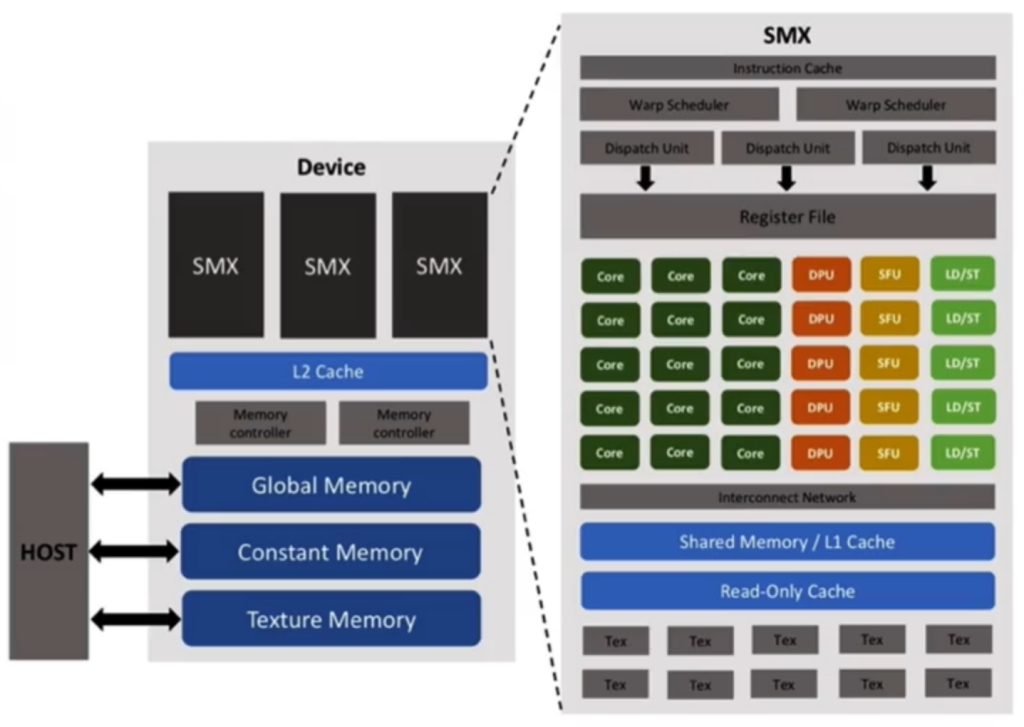
- Connected to the HOST on the far left you’ll recognize the Global Memory that we used in my last post. This is the largest memory, most accessible but also the slowest. When this is accessed copies will be saved into the L1 Cache and (if there’s overflow) the L2 Cache.
- Also connected to the HOST you’ll see Constant Memory and Texture Memory. Constant Memory allows you to create constants that are accessible by all blocks. It’s tackled in the course. Texture Memory isn’t covered in this course at all, seemingly since texture memory has been deprecated for a while. Seems like directly interacting with Texture Memory has been replaced with the cudaTextureObject_t class.
- On the bottom right there’s the “Shared Memory / L1 Cache”. These are actually separate but share the same physical location,
- The Shared Memory is shared between all threads in a block. We’ll learn how to directly access this below.
- L1 Cache of course is the closest cache to the threads, so it’s where the GPU will store frequently accessed information. We don’t directly access this. Note the L2 Cache is separate from this block, on the “Device” level.
- Finally there’s the Register File, right above all the cores and other per thread units. This is where variables you declare inside a thread (so in a
__global__or__device__function) get stored.
So based on this, we can create the following comparisons (which will be slightly different than the comparisons in the course).
| Initial Access Speed | Cached? | Size | Scope | Access | |
| Global Memory | Very Slow | Yes, L1 then L2. | GBs | Shared in kernel call (global) | __host__: directly, passed into kernel__global__: argument__device__:argument |
| Constant Memory | Slow | Yes, seemingly separate cache instead of L1. | ~64 KBs | Shared in kernel call (global) | directly in __host__ and __global____device__:argument |
| Shared Memory | Fast | N/A | KBs | Shared in Block | Declared in a __global__ or __device__ function |
| Register Memory | Fastest | N/A | ~64 KBs | Thread Safe | Declared in a __global__ or __device__ function |
To explain the table using the Global Memory as an example:
- Global Memory is off chip, so the initial access is very slow. However this can use L1 and L2 memory, which can impact repeated access.
- The actual size of Global Memory depends on your GPU, but for NVidia GPUs this is in the realm of GBs.
- Scope is here to define if each thread or block will have a copy of the data, or if all threads will access the same memory location. For instance all threads in the kernel will access the same Global Memory.
- An important detail is how this memory is accessed & declared. Global Memory is the main way of sending and receiving data between the host and GPU, so it’s accessed in the
__host__and__global__functions. Of course you can pass variables in global memory as arguments to__device__functions.
Now to chat about the other types of memory.
Constant Memory
When you call a kernel, some arguments don’t need to be modifiable (a strength argument) and some of those can be used repeatedly with the same value (the 3×3 blur kernel). Here’s how we create and load them:
A couple of important notes:
- You do not pass these as arguments to your kernel. Instead they are directly accessible from any
__global__function.- While I’ve not seen anything talk about
__device__functions, experimentation shows to me that if you attempt to directly call them from a__device__function you’ll just get 0ed out data.
- While I’ve not seen anything talk about
- Note the array. In my experiments you get an illegal argument exception if you try to make an array with a dynamic size, but I hope I just didn’t find the right way to get that to work.
- Since these are constants, they’ll be accessible from ANY
__global__function. Therefore name collision will be important. - In general a GPU only sets aside 64 KBs for constant memory. There might be a way to expand this in newer GPUs but it’s best to assume there is only 64 KBs of constant memory.
- According to the course this is copied to the Read-Only Cache. If you get a cache miss (so you can’t copy to it) the course mentions it being handled as a global variable, heavily implying (but not directly stating) that on cache misses constant memory will directly use the L2 memory.
Shared Memory
Some types of data can be shared in the same block. Say you’re replicating a map-reduce function – you can save the combined value for the whole block in a single variable and then increment when everything is done. Or maybe you want to guarantee this variable is quick to access (aka it’s in L1 memory). Here’s how you declare and use a variable in shared memory:
The only vital thing to note is that when we interact with a shared variable we need to call __syncthreads() at the end. In this example, calling __syncthreads() ensures we have the full count before we return a value. The course doesn’t explain well how
Register Memory
This is the local memory. Just declaring a variable in a __device__ or __global__ function uses register memory, the memory closest to the actual processing portions of the chip therefore the quickest to access. This is declared per thread, so by definition this is thread safe. However anything declared in register memory will be forgotten once this current thread finishes, so save data appropriately.
Leave a Reply